Recommended Starting Points
These routes cover common player tasks: checking builds, reading items, picking heroes, and confirming counter paths.
#1
Deadlock Builds
Compare hero builds, core items, phase routes, and counter-pick choices in one hub.
#2
Deadlock Counter Build Advisor
Use enemy threats to narrow counter items, then continue into Build Planner for the full route.
#3
Focus Lens Deadlock item guide
Open stats, best heroes, buy timing, and builds that can use the item.
#4
Spirit Shredder Bullets Deadlock item guide
Jump from the homepage into the item guide, then continue into hero fits and related builds.
#5
Shiv Deadlock build and counter guide
Start with Shiv builds, abilities, items, and counter routes.
#6
Vyper Deadlock build and counter guide
Use the homepage route to connect hero detail, build routes, and counter tools.
#7
Mina Deadlock build and ability guide
Open Mina's ranged pressure, reposition reset, and core build route from one entry.
#8
Rapid Rounds Deadlock item guide
Start with this low-cost weapon tempo item, then continue into best heroes, buy timing, and swaps.
#9
Night Shift Builds
Filter the build library for flank, night-pressure, and reposition routes before opening the matching hero page.
Start Here
Treat the homepage as an entry panel and start with these three reading paths instead of browsing everything at once.
Choose by question type
If you are here to make a faster decision instead of just reading reference pages, choose the entry point by the real question you have right now.
I have not decided the hero yet
Start with starter picks, hero compare, and draft order to narrow the pool down to one or two realistic choices.
Start with picksI know the hero, but not the build
Start with Build Planner, then use Item Helper and Build Counter Advisor to compress the route around the real match need.
Start with buildsI am more worried about comp, lane, or patch context
Start with team comp, lane assistant, and patch impact tools to solve the environment question before returning to hero or build pages.
Start with contextVersion read snapshot
If you want to decide which hero to open first in the current version, this layer surfaces the site's hero, tempo, and build clues up front.
Recent tool paths
If you already made decisions in the utility layer, your most recent tool routes show up here so you can resume quickly next time.
Recently used
#1
09-29-2026
If you only read one page first, start with the patch summary and decide from there whether heroes, items, or builds deserve the next click.
#2
Hero Directory
If you want to learn the game through characters, enter the hero directory first and sort by role, difficulty, and current priority.
#3
Build Library
If you want concrete progression routes right away, go to the build library and read patch, hero, and item context together.
Current Priorities
Use the site's current data to jump straight into the heroes, items, and patch context worth reading first.
#1
09-29-2026
Track the current release note anchor for the site.
#2
Mo & Krill
Read Mo & Krill first through its frontline engage identity, then use the rest of the page to refine the execution details.
#3
Warden
Read Warden first through its frontline engage identity, then use the rest of the page to refine the execution details.
#4
Abrams
Read Abrams first through its frontline engage identity, then use the rest of the page to refine the execution details.
#5
Extra Health
6 hero recommendations · 800
#6
Extra Spirit
6 hero recommendations · 800
#7
Headshot Booster
6 hero recommendations · 800
This Week's Priority Reads
If you only plan to read a few pages first, start with these.
#1
09-29-2026
Start from the latest patch summary, then decide which hero or item lane to drill into.
#2
Mo & Krill
Read Mo & Krill first through its frontline engage identity, then use the rest of the page to refine the execution details.
#3
Warden
Read Warden first through its frontline engage identity, then use the rest of the page to refine the execution details.
#4
Extra Health
6 hero recommendations make this a strong current build entry point.
#5
Extra Spirit
6 hero recommendations make this a strong current build entry point.
Community Signal Routes
These pages do not replace live balance data. They explain what players are discussing, why it matters, and which content deserves deeper follow-through.
#1
Deadlock Ranks Explained
Understand ranked access, hero-pool preparation, and the boundary between rules and planning tools.
#2
Ivy Deadlock build and counter guide
Open Ivy team utility, ability order, core items, and counters.
#3
Celeste Deadlock build and counter guide
Read Celeste ranged pressure, safe spacing, and core build routes.
#4
2026 Community Survey Takeaways
Read public-sample player makeup, retention pressure, and editorial priorities before choosing a site tool.
#5
Community Complaint Tracker
Read ranked, matchmaking, ban, and behaviour-system friction together instead of treating one thread as the whole story.
#6
Hero Personality and Voice-Line Roundup
See why some heroes stay central to memes, voice threads, and character debate even when their meta strength moves.
#7
Weekly Meme, Fan Art, and Cosplay Digest
Scan recent creative mood and connect character heat back to the site's formal guide routes.
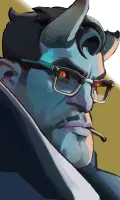
Abrams
A hard-engage frontline bruiser who absorbs pressure, crashes into formations, and keeps fighting through sustained self-healing.
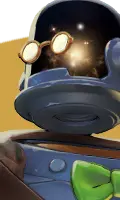
Dynamo
A utility-focused mystic who protects teammates, controls fight timing, and amplifies coordinated engagements.
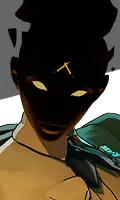
Haze
A stealth assassin who is most dangerous when she controls the timing, angle, and target of every commit.
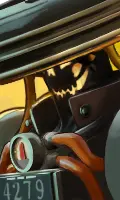
Seven
A high-pressure mystic who turns neutral space into a dangerous network of lightning and zone control.
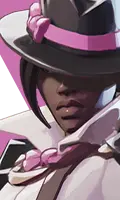
Wraith
A pick-focused assassin who converts one vulnerable target into a cleaner fight for her team.

Viscous
A disruption specialist who survives awkwardly, scrambles enemy plans, and turns clean fights messy.
Why this MVP exists
#1
Bilingual hero pages with structured stats and ability summaries.
This is one of the core promises of the site and helps you decide which directory to open next.
#2
Cleaner item browsing by category and cost tier.
This is one of the core promises of the site and helps you decide which directory to open next.
#3
A latest-patch hub that can grow into a faster update workflow.
This is one of the core promises of the site and helps you decide which directory to open next.
Continue Reading
Once you finish the first homepage pass, continue from these site hubs.
#1
Item Directory
Scan the core economy by category and tier before full item detail pages are added.
#2
Meta Overview
Compare hero stat profiles and item recommendation heat without needing external trackers.
#3
Beginner Guide
Learn the map, roles, and what to prioritize in your first matches.
#4
Site Search
Search heroes, items, legacy aliases, patches, and beginner guides from one place.
#5
Deadlock Build Planner
Choose a hero and a match need to get a more targeted Deadlock build route fast.
#6
Tools Hub
If you already know the question you are asking, jump straight into the best-fit decision tool from the tools hub.
Featured Tools
If you are here to make a faster decision rather than just read reference pages, start from these tools first.
#1
Tools Hub
Open the full utility layer in one place and decide whether your current problem is draft, comp, lane, or build related.
#2
Team Comp Helper
Find the missing team layer first, then decide who should fill the next pick slot.
#3
Deadlock Counter Build Advisor
Use your hero and the enemy threat to narrow down the counter-build direction fast.
#4
Draft Order Helper
Use stage, priority, and missing role to decide what this pick should secure first.
First-visit FAQ
Use these questions to understand how the site works, what it is best for, and where its boundaries are.
#1
What page should I open first on my first visit?
If you only open one page first, start with the latest patch 09-29-2026 and then continue into the hero directory or build library.
#2
What is this site best used for?
It is best used for quickly reading the relationship between heroes, items, builds, and patches before a match starts.
#3
What should I do if I find incorrect data?
Use the contact page in the footer and include a page link, hero name, item name, or patch version so the issue can be checked faster.
#4
Is this site official?
No. DeadlockDB Wiki is an unofficial fan-made reference site and works best when read alongside the game client, patch notes, and live experience.